PowerBake Developer Guide
Acknowledgements
PowerBake is a brownfield project built upon the AddressBook-Level3 project created by SE-EDU.
Setting up, getting started
Refer to the guide Setting up and getting started.
Design
Architecture
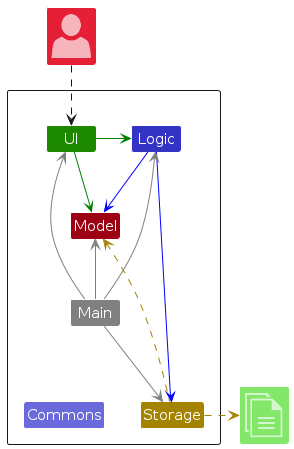
The Architecture Diagram given above explains the high-level design of the App.
Below is a quick overview of main components and how they interact with each other.
Main components of the architecture
Main (consisting of classes Main and MainApp) is in charge of the app launch and shut down.
- At app launch, it initializes the other components in the correct sequence, and connects them up with each other.
- At shut down, it shuts down the other components and invokes cleanup methods where necessary.
The bulk of the app's work is done by the following four components:
UI: The UI of the App.Logic: The command executor.Model: Holds the data of the App in memory.Storage: Reads data from, and writes data to, the hard disk.
Commons represents a collection of classes used by multiple other components.
How the architecture components interact with each other
The Sequence Diagram below shows how the components interact with each other for the scenario where the user issues the command delete 1.
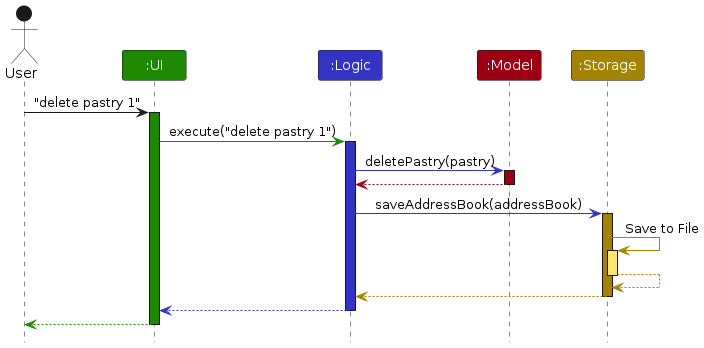
Each of the four main components (also shown in the diagram above),
- defines its API in an
interfacewith the same name as the Component. - implements its functionality using a concrete
{Component Name}Managerclass which follows the corresponding APIinterfacementioned in the previous point.
For example, the Logic component defines its API in the Logic.java interface and implements its functionality using the LogicManager.java class which follows the Logic interface. Other components interact with a given component through its interface rather than the concrete class (reason: to prevent outside component's being coupled to the implementation of a component), as illustrated in the (partial) class diagram below.
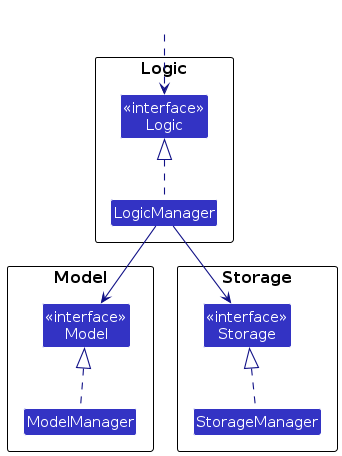
The sections below give more details of each component.
UI Component
The API of this component is specified in Ui.java
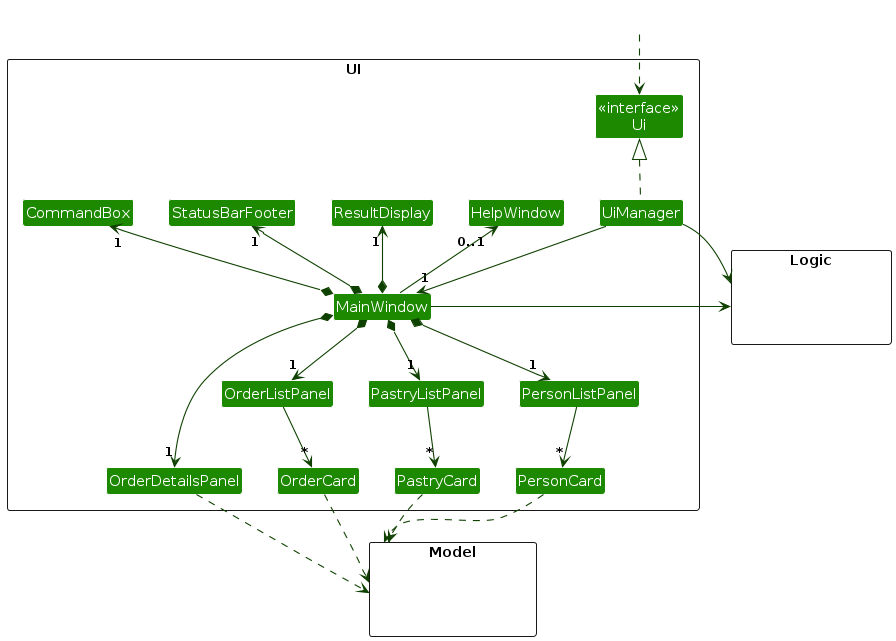
The UI consists of a MainWindow that is made up of parts e.g.CommandBox, ResultDisplay, PersonListPanel, StatusBarFooter, PastryListPanel and etc.. All these, including the MainWindow, inherit from the abstract UiPart class which captures the commonalities between classes that represent parts of the visible GUI. Such as methods which help load the FXML files. Due to the sheer number of components inhering from the abstract UiPart class, the inheritance has been shown in the diagram below instead.
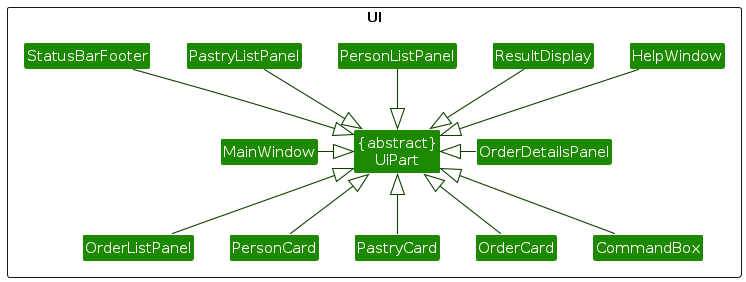
The UI component uses the JavaFx UI framework. The layout of these UI parts are defined in matching .fxml files that are in the src/main/resources/view folder. For example, the layout of the MainWindow is specified in MainWindow.fxml
The UI component,
- executes user commands using the
Logiccomponent. - listens for changes to
Modeldata so that the UI can be updated with the modified data. - keeps a reference to the
Logiccomponent, because theUIrelies on theLogicto execute commands. - depends on some classes in the
Modelcomponent, as it displaysPersonobject residing in theModel.
Logic Component
API : Logic.java
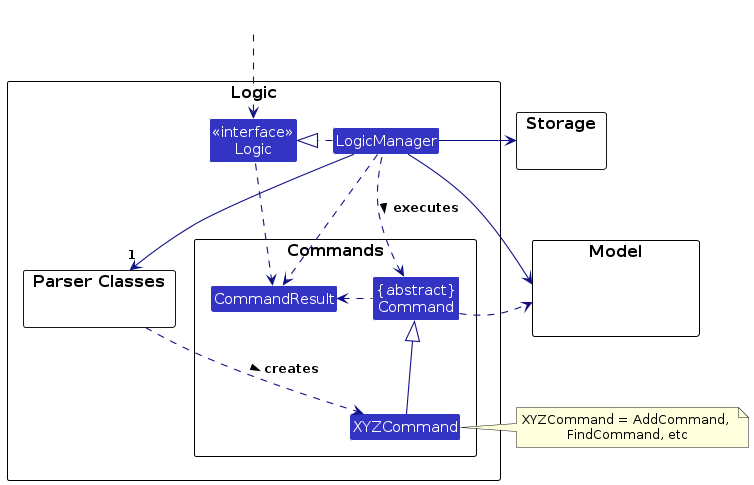
Here's a (partial) class diagram of the Logic component:
The sequence diagram below illustrates the interactions within the Logic component, taking execute("delete 1") API call as an example.
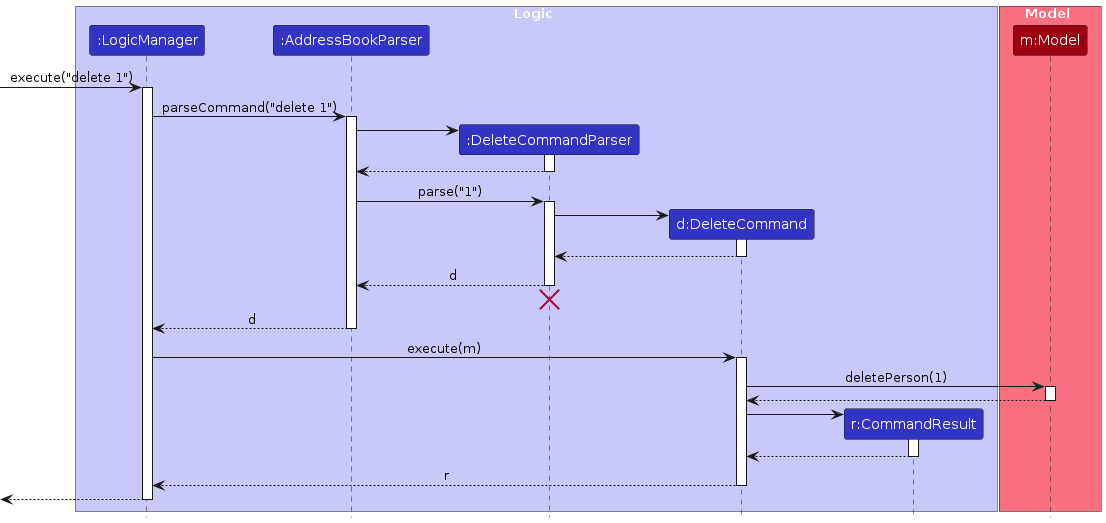
Note: The lifeline for DeleteCommandParser should end at the destroy marker (X) but due to a limitation of PlantUML, the lifeline continues till the end of diagram.
How the Logic component works:
- When
Logicis called upon to execute a command, it is passed to anAddressBookParserobject which in turn creates a parser that matches the command (e.g.,DeleteCommandParser) and uses it to parse the command. - This results in a
Commandobject (more precisely, an object of one of its subclasses e.g.,DeleteCommand) which is executed by theLogicManager. - The command can communicate with the
Modelwhen it is executed (e.g. to delete a person).
Note that although this is shown as a single step in the diagram above (for simplicity), in the code it can take several interactions (between the command object and theModel) to achieve. - The result of the command execution is encapsulated as a
CommandResultobject which is returned back fromLogic.
Here are the other classes in Logic (omitted from the class diagram above) that are used for parsing a user command:
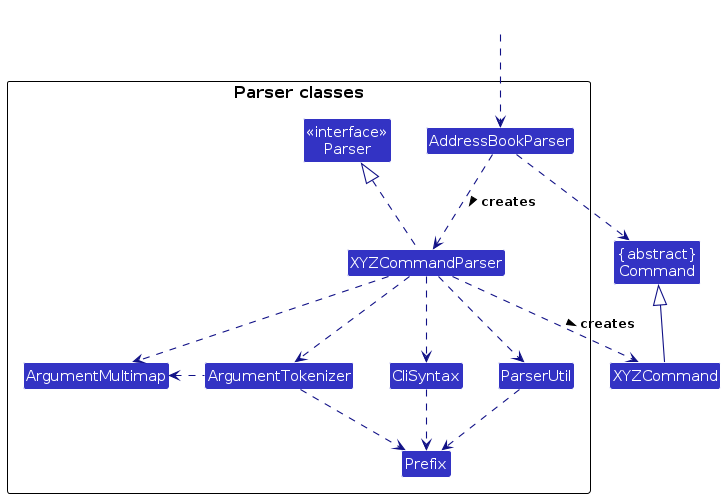
How the parsing works:
- When called upon to parse a user command, the
AddressBookParserclass creates anXYZCommandParser(XYZis a placeholder for the specific command name e.g.,AddCommandParser) which uses the other classes shown above to parse the user command and create aXYZCommandobject (e.g.,AddCommand) which theAddressBookParserreturns back as aCommandobject. - All
XYZCommandParserclasses (e.g.,AddCommandParser,DeleteCommandParser, ...) inherit from theParserinterface so that they can be treated similarly where possible e.g, during testing.
Model Component
API : Model.java
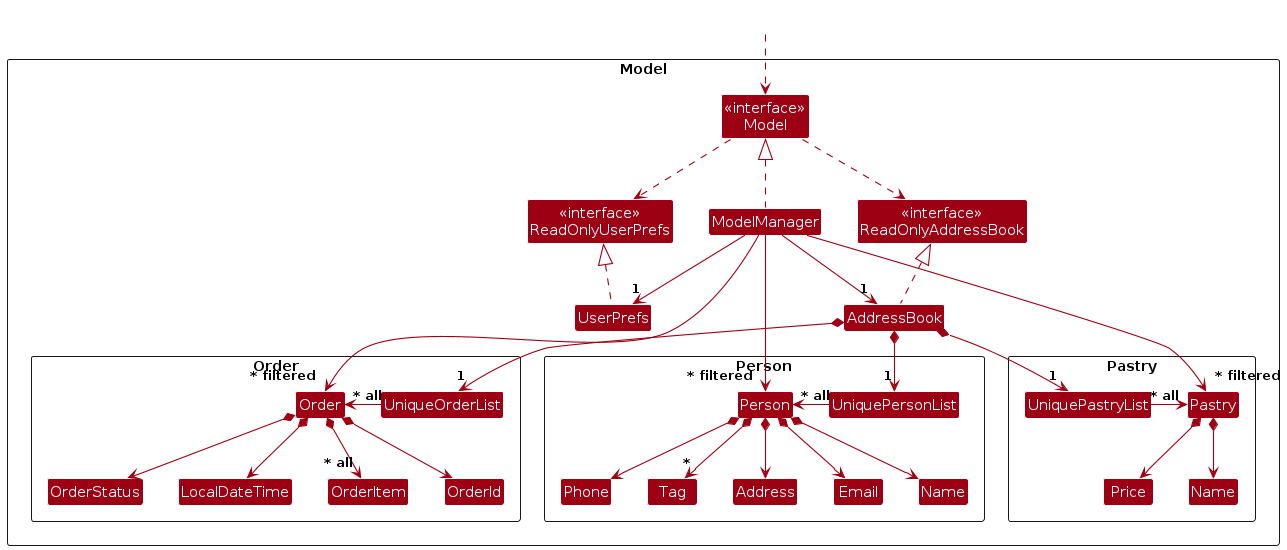
The Model component,
- stores the address book data.
- all
Personobjects (which are contained in aUniquePersonListobject). - all
Pastryobjects (which are contained in aUniquePastryListobject). - all
Orderobjects (which are contained in aUniqueOrderListobject).
- stores the currently 'selected'
Personobjects (e.g., results of a search query) as a separate filtered list which is exposed to outsiders as an unmodifiableObservableList<Person>that can be 'observed' e.g. the UI can be bound to this list so that the UI automatically updates when the data in the list change. - same idea applies to
PastryandOrderobjects. - stores a
UserPrefobject that represents the user’s preferences. This is exposed to the outside as aReadOnlyUserPrefobjects. - does not depend on any of the other three components (as the
Modelrepresents data entities of the domain, they should make sense on their own without depending on other components)
Storage Component
API : Storage.java
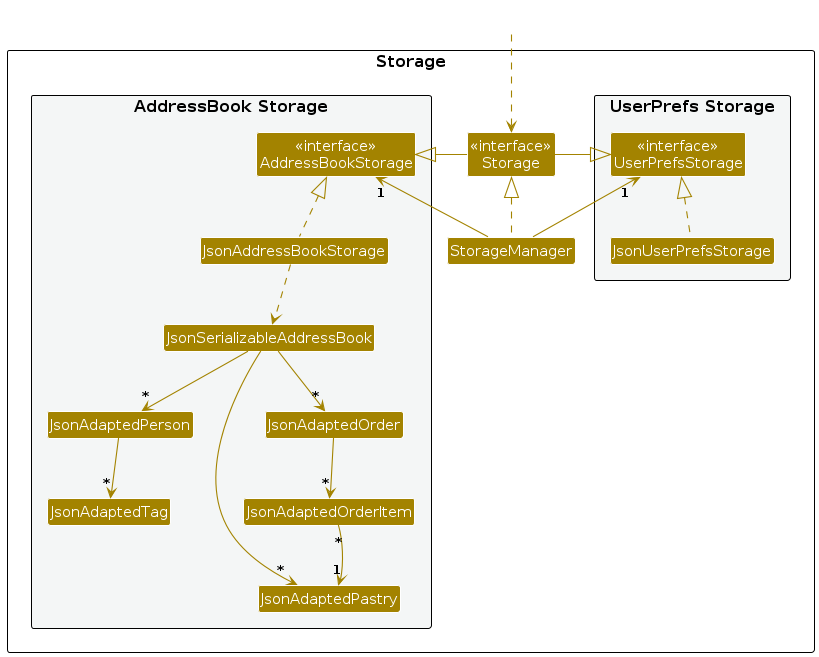
The Storage component,
- can save both address book data and user preference data in JSON format, and read them back into corresponding objects.
- inherits from both
AddressBookStorageandUserPrefStorage, which means it can be treated as either one (if only the functionality of only one is needed). - depends on some classes in the
Modelcomponent (because theStoragecomponent's job is to save/retrieve objects that belong to theModel)
Common Classes
Classes used by multiple components are in the powerbake.address.commons package.
Implementation
This section describes how some noteworthy features were implemented.
add order - Add Order
This command enables the addition of an Order for a specified Client in the Model. Its implementation involves validating client existence, pastry availability, and coordinating updates between the Model and UI components.
As a refresher, this is the add order command as described in the User Guide:
Format:
add order CLIENT_INDEX -pn PASTRY_NAME -q QUANTITY [-pn PASTRY_NAME -q QUANTITY]
Example:
add order 1 -pn Croissant -q 10 -pn Apple Pie -q 20
adds an order for the client at index 1 with 10 Croissants and 20 Apple Pies.
Overview
When executed, this command parses user input and creates an internal representation of the order data. The sequence proceeds as follows:
Parse Command and Validate Client:
- The input command text is parsed to identify the client index and order details.
- The system validates that the client index exists in the current filtered client list.
- If the client is found, the process continues with validating pastry items.
Validate Pastry Items:
- For each pastry name specified, the system checks if it exists in the current pastry list.
- The system ensures no duplicate pastry entries exist in a single order.
- Valid quantities are checked for each pastry.
Create and Add Order:
- A new Order object is created with the validated client and a list of OrderItem objects.
- Each OrderItem contains a reference to a Pastry and its quantity.
- The order is automatically assigned a "pending" status.
Model Update:
- The model adds the new order to the address book, which updates the internal list of orders.
- This triggers observers to notify relevant UI components.
Automatic UI Refresh:
- The OrderListPanel UI component, which observes changes in the list of orders, detects the addition and refreshes its display.
- The UI reflects this change by showing a new OrderCard for the recently added order.
The Order implementation uses a unique identifier (OrderId) that's automatically generated to ensure orders can be uniquely identified in the system, even when multiple orders come from the same client.
Sequence Diagram
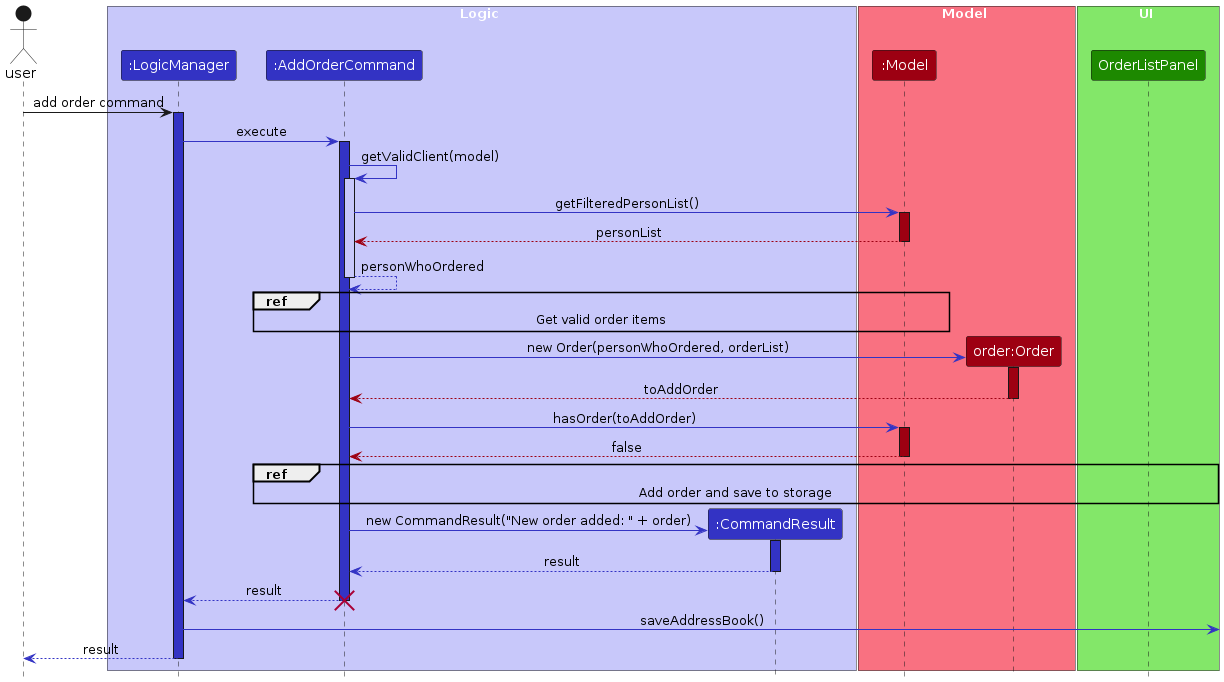
This sequence diagram shows the overall flow of the add order command.
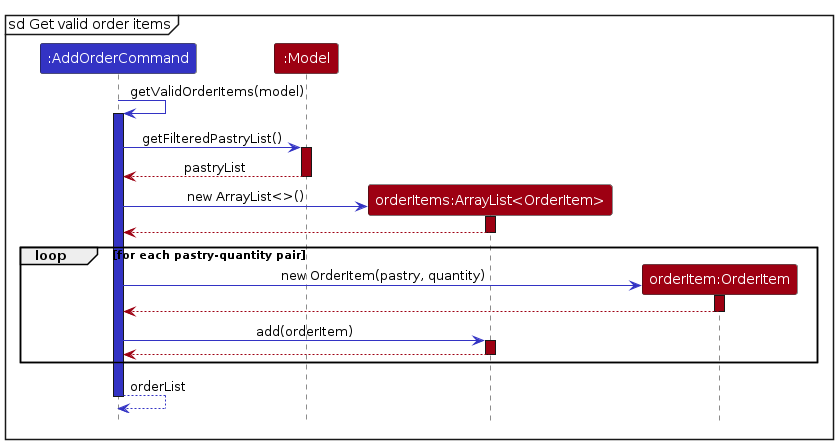
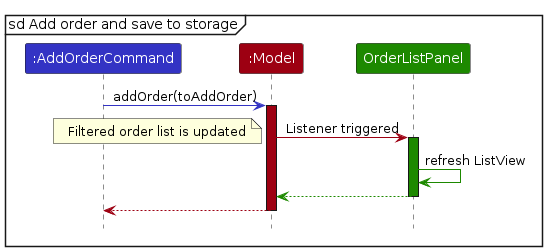
Note: due to a limitation of PlantUML, the lifeline reaches the end of diagram.
Documentation, Logging, Testing, Configuration, Dev-ops
Appendix: Requirements
Product Scope
Target user profile:
- Is a small home bakery
- Sells their own pastries online through home deliveries
- Prefers desktop apps over other types
- Can type fast
- Prefers typing to mouse interactions
- Is reasonably comfortable using CLI apps
- Uses English as their main language
Value proposition: Keeping track of customers and their orders is hard for small business owners, this provides them with fast access to their orders that they can track.
- Provides a customer list where they are able to track customers and their orders
- Provides an order list so they can keep track of customers orders
- Provides a pastry list so they can keep track of their pastries
User Stories
Priorities: High (must have) - * * *, Medium (nice to have) - * *, Low (unlikely to have) - *
| Priority | As a … | I want to … | So that ... |
|---|---|---|---|
* * * | Bakery Owner | add client details | I can keep track of their delivery location and order details |
* * * | Bakery Owner | delete client details | I can get rid of irrelevant clients |
* * * | Bakery Owner | I can create new pastries | I can when I make new pastries I can add them to the list of available pastries |
* * * | Bakery Owner | I can delete pastries | I can remove no longer available pastries |
* * * | Bakery Owner | I can create new orders | I can keep track of my current orders |
* * * | Bakery Owner | I can delete orders | I can remove no longer relevant orders |
* * * | Bakery Owner | view a list of pastries | I can access the types of pastries I have |
* * * | Bakery Owner | view a list of clients | I can access the client information easily |
* * * | Bakery Owner | view a list of orders | I can access the order information easily |
* * * | Bakery Owner | access the system via a GUI on macOS/Linux | I don’t need specialized hardware/software to manage my business |
* * * | Bakery Owner | use the system offline | I can have access to the system at all times |
* * | Bakery Owner | come back to the system with all my previous entries | I do not have to re-enter all client and pastries entries every time |
Use Cases
(For all use cases below, the System is the PowerBake and the Actor is the user, unless specified otherwise)
Use case: View Client Details
MSS
User requests to list all clients
PowerBake shows a list of clients
Use case ends.
Extensions
2a. The list is empty.
Use case ends.
Use case: Add Client
MSS
User types add client command into PowerBake
PowerBake adds client details
Use case ends.
Use case: Edit Client
MSS
User types edit client command with details into PowerBake
PowerBake updates the client details
Use case ends.
Extensions
1a. Index is invalid
- 1a1. PowerBake prints error message
Use case ends.
1b. No fields are specified for editing
- 1b1. PowerBake prints error message
Use case ends.
1c. Format of edited fields is invalid
- 1c1. PowerBake prints error message
Use case ends.
Use case: Delete Client
MSS
User types delete client command (with index) into PowerBake
PowerBake delete client details
Use case ends.
Extensions
1a. Index is invalid
- 1a1. PowerBake prints error message
Use case ends.
Use case: Find Client
MSS
User types find client command with keyword into PowerBake
PowerBake displays clients matching the keyword
Use case ends.
Extensions
2a. No clients match the keyword
- 2a1. PowerBake shows an empty list
Use case ends.
Use case: View Pastries Details
MSS
User requests to list all pastries
PowerBake shows a list of pastries
Use case ends.
Extensions
2a. The list is empty.
Use case ends.
Use case: Add Pastries
MSS
User types add pastries command into PowerBake
PowerBake adds pastries details
Use case ends.
Use case: Edit Pastry
MSS
User types edit pastry command with details into PowerBake
PowerBake updates the pastry details
Use case ends.
Extensions
1a. Index is invalid
- 1a1. PowerBake prints error message
Use case ends.
1b. No fields are specified for editing
- 1b1. PowerBake prints error message
Use case ends.
1c. Format of edited fields is invalid
- 1c1. PowerBake prints error message
Use case ends.
Use case: Delete Pastries
MSS
User types delete pastries command (with index) into PowerBake
PowerBake delete pastries details
Use case ends.
Extensions
1a. Index is invalid
- 1a1. PowerBake prints error message
Use case ends.
Use case: Find Pastry
MSS
User types find pastry command with keyword into PowerBake
PowerBake displays pastries matching the keyword
Use case ends.
Extensions
2a. No pastries match the keyword
- 2a1. PowerBake shows an empty list
Use case ends.
Use case: View Orders
MSS
User requests to list all orders
PowerBake shows a list of orders
Use case ends.
Extensions
2a. The list is empty.
Use case ends.
Use case: Add Order
MSS
User types add order command into PowerBake
PowerBake adds order details
Use case ends.
Extensions
1a. The client index is invalid
- 1a1. PowerBake shows an error message
Use case ends.
1b. The pastry name provided doesn't exist
- 1b1. PowerBake shows an error message
Use case ends.
1c. The quantity provided is invalid
- 1c1. PowerBake shows an error message
Use case ends.
Use case: Edit Order
MSS
User types edit order command with status into PowerBake
PowerBake updates the order status
Use case ends.
Extensions
1a. Index is invalid
- 1a1. PowerBake prints error message
Use case ends.
1b. Status value is invalid
- 1b1. PowerBake prints error message
Use case ends.
Use case: Delete Order
MSS
User types delete order command (with index) into PowerBake
PowerBake deletes order
Use case ends.
Extensions
1a. Index is invalid
- 1a1. PowerBake prints error message
Use case ends.
Use case: Find Order
MSS
User types find order command with keyword into PowerBake
PowerBake displays orders matching the keyword
Use case ends.
Extensions
2a. No orders match the keyword
- 2a1. PowerBake shows an empty list
Use case ends.
Non-Functional Requirements
- The system shall provide a graphical user interface compatible with major operating systems.
- The system must function offline with full capabilities.
- All data must persist between sessions, requiring no re-entry of client or pastry information.
- The interface must be intuitive enough that users unfamiliar with computers can navigate it with minimal confusion.
- The system must load order and client pages in under 2 seconds, even when handling 500+ entries.
Glossary
| Term | Explanation |
|---|---|
| Client/Customer | A client/customer in a bakery is a regular or business customer who places orders for baked goods, often in bulk or on a recurring basis. |
| Command | A user input that directs Powerbake to carry out a particular action. |
| Command Line Interface (CLI) | An interface where users interact with a system by entering text commands into a terminal or console. |
| Command Terminal | A text-based interface for interacting with the computer. Examples include the Command Prompt on Windows, Terminal on macOS, and bash on Linux. |
| Graphical User Interface (GUI) | An interface that enables users to engage with a system using visual elements like icons and other graphical indicators. |
| Home Folder | The folder where Powerbake is saved. The home folder is used to store data files used by Powerbake. |
| Hyperlink | A clickable reference on a webpage that directs users to another location or file, either on the same page or a different one. |
| JSON (JavaScript Object Notation) | A simple, human-readable data format used for data exchange that is easily parsed and generated by machines. |
| Local Storage | Local storage in an application refers to a method of storing data on a user's device, allowing the application to save information persistently without requiring a server connection. |
| Mainstream OS | Mainstream operating systems such as Windows, macOS and Linux. |
| Orders | Orders in a bakery refer to customer requests for specific baked goods, either for immediate purchase or scheduled pickup/delivery, often including custom or bulk requests. PowerBake assumes orders are mutually agreed upon creation and orders are used purely for order fufillment. |
| Parameter | A variable in a command that stands in for a specific piece of information that must be supplied when the command is executed. |
| Pastry | A Pastry in a bakery refers to baked goods made from dough or batter, often enriched with butter, sugar, and fillings like cream, fruit, or chocolate, including items such as croissants, danishes, and tarts. |
| Person | Used interchangeably between client or customers in development |
Appendix: Instructions for Manual Testing
Given below are instructions to test the app manually.
Note: These instructions only provide a starting point for testers to work on; testers are expected to do more exploratory testing.
Launch and Shutdown
Initial launch
- Download the jar file and copy into an empty folder
- Double-click the jar file or run
java -jar powerbake.jar
Expected: Shows the GUI with a set of sample clients, pastry and order.
Shutdown
- Click "File" in the top left-hand corner of the GUI
- Click "Exit" in the drop-down menu
Expected: The app shuts down and all data is saved.
Adding a Client
Pre-requisite: Launched the app
Test case:
add client Baobao -p 12345678 -e bao@gmail.com -a Sengkang Central.Expected: New client is added and displayed in client scrolling panel. Success message is displayed.
Test case:
add client Baobao -p 12345678Expected: Error message is displayed. Correct format is displayed in display box.
Other incorrect commands to try:
add Client,add baobaoExpected: Error message is displayed. Correct format is displayed in display box.
Adding a Pastry
Pre-requisite: Launched the app
Test case:
add pastry Croissant -pr 5.00.Expected: New pastry is added and displayed in pastry scrolling panel. Success message is displayed.
Test case:
add pastry CroissantExpected: Error message is displayed. Correct format is displayed in display box.
Other incorrect commands to try:
add Pastry,add pastry Bao -pr 5.111Expected: Error message is displayed. Correct format is displayed in display box.
Adding an Order
Pre-requisite:
- Launched the app
- Add at least one Client and Pastry
Test case:
add order 1 -pn Croissant -q 100.Expected: New order for client of index 1 is added and displayed in order scrolling panel. Success message is shown.
Test case:
add order 1Expected: Error message is displayed. Correct format is displayed in display box.
Other incorrect commands to try:
add order 1 -pn Croissant,add orderExpected: Error message is displayed. Correct format is displayed in display box.
Delete a Client
Pre-requisite:
- Launched the app
- Have at least one client
Test case:
delete client 1.Expected: Delete client of index one and removed from client scrolling panel. Success message displayed.
Test case:
delete client -1.Expected: Error message displaying invalid index.
Other incorrect commands to try:
delete ClientExpected: Error message displaying invalid index.
Delete a Pastry
Pre-requisite:
- Launched the app
- Have at least one pastry
Test case:
delete pastry 1.Expected: Delete pastry of index one and removed from pastry scrolling panel. Success message displayed.
Test case:
delete pastry -1.Expected: Error message displaying invalid index.
Other incorrect delete commands to try: delete Pastry
Expected: Error message displaying invalid format.bove
Delete an Order
Pre-requisite:
- Launched the app
- Have at least one order
Test case:
delete order 1.Expected: Delete order of index one and removed from order scrolling panel. Success message displayed.
Test case:
delete order -1.Expected: Error message displaying invalid index.
Other incorrect delete commands to try: delete Order
Expected: Error message displaying invalid format.
Edit a Client
Pre-requisite:
- Launched the app
- Have at least one client
Test case:
edit client 1 -n Bobby.Expected: Edit client's name of index one to Bobby. Success message displayed.
Test case:
edit client Bobby.Expected: Error message displaying invalid format.
Other incorrect commands to try:
edit client 1Expected: Error message displaying invalid format.
Edit a Pastry
Pre-requisite:
- Launched the app
- Have at least one pastry
Test case:
edit pastry 1 -n Pie.Expected: Edit Pastry's name of index one to Pie. Success message displayed.
Test case:
edit pastry Pie.Expected: Error message displaying invalid format.
Other incorrect commands to try:
edit pastryExpected: Error message displaying invalid format.
Edit an Order
Pre-requisite:
- Launched the app
- Have at least one order
Test case:
edit order 1 -s delivered.Expected: Edit order's status to delivered. Success message displayed.
Test case:
edit order 1.Expected: Error message displaying invalid format.
Other incorrect commands to try:
edit orderExpected: Error message displaying invalid format.
Find a Client
Pre-requisite:
- Launched the app
Test case:
find client Bobby.Expected: Display client list with matching keywords.
Test case:
find Bobby.Expected: Error message displaying invalid format.
Find a Pastry
Pre-requisite:
- Launched the app
Test case:
find pastry Croissant.Expected: Display pastry list with matching keywords.
Test case:
find CroissantExpected: Error message displaying invalid format.
Find an Order
Pre-requisite:
- Launched the app
Test case:
find order Bobby.Expected: Display client list with matching keywords.
Test case:
find Bobby.Expected: Error message displaying invalid format.
View all Clients
Pre-requisite:
- Launched the app
Test case:
view client.Expected: Display full client list.
Test case:
view.Expected: Error message displaying invalid format.
View all Pastry
Pre-requisite:
- Launched the app
Test case:
view pastry.Expected: Display full pastry list.
Test case:
view.Expected: Error message displaying invalid format.
View all Orders
Test case:
view order.Expected: Display full order list.
Test case:
view.Expected: Error message displaying invalid format.
Appendix: Planned Enhancements
1. Improve help Command Pop-up to Include Command Overview
Currently, the help pop-up only contains a link to the User Guide online. However this could be unintuitive as users have to copy the link and open the browser to access the User Guide. Information such as an overview of the commands should be readily available in the help pop-up. This will allow users to quickly access the information they need without having to leave the app.
Proposed Changes:
- Add a command overview to the help pop-up.
This will provide users with a quick reference to the available commands and their usage.
2. Enhance Client and Pastry NAME Validation
Currently, PowerBake only allows alphanumeric characters and spaces in client and pastry names. This is a limitation as some names may contain special characters such as slashes, hyphens, accented characters and different languages. In the future, we will enhance the validation to allow these characters so that names such as Janet Smith-Johnson, Mike O'Leary, María José and etc. can be added to our system.
Proposed Changes:
- Allow for special characters and accented characters, widening the scope of valid names that can be added to the system.
These changes are expected to improve PowerBake's consistency and usability especially when used with other languages.
3. Improve EMAIL Validation for Clients
PowerBake's current email validation doesn't fully verify that email addresses it receives are actually valid.
One example of this is that invalid emails that do not contain valid top-level domains (TLDs) can be added. This can lead to accepting technically invalid email addresses that won't function for client communications.
Proposed Changes:
- Explore different email validations techniques like using Apache Commons Validator to enhance email validation.
This improvement will help ensure that client contact information is accurate and functional, reducing communication failures.
4. Make Certain Fields Optional when Adding Clients
Currently, parameters NAME, PHONE, ADDRESS and EMAIL are mandatory when adding a client. However, there may be situations where certain information is not available at the time of client creation,
such as some clients who may lack an email address.
Proposed Changes:
- Make the email and address fields optional when adding a new client.
- Provide visual indicators in the UI for clients with incomplete information.
- Add the ability to update client profiles later when the missing information becomes available.
These changes will make the client registration process more flexible and accommodate various business scenarios where complete information may not be immediately available.
5. Enhance Add Order Functionality with Batch Processing
Currently, users can only create one order at a time, requiring separate command executions for multiple clients even when they're ordering the same pastries. This is inefficient for bakery owners who often process similar bulk orders for different clients.
Proposed Changes:
- Implement a new batch order command syntax that allows multiple client orders to be created simultaneously.
- Enable specifying multiple client indices when the pastry selections are identical.
- Add validation to ensure all client indices are valid before processing any orders.
These improvements would significantly reduce the time spent on data entry for bakery owners who process multiple similar orders in a single session.
6. Enhance Search Functionality with Filtering and Sorting Capabilities
The current search functionality for clients/pastries/orders only allows searching by name. This limitation makes it difficult to quickly locate items based on other important criteria such as phone number, address, price, order status, date, pastry type and etc..
Proposed Changes:
- Extend the find command to support additional search parameters including phone number, address, price, order status, date, pastry type and etc..
- Implement sorting capabilities for search results based on different attributes (phone number, price, order, date and etc.).
- Add combined filtering options to narrow search results using multiple criteria simultaneously.
These improvements will give bakery owners more powerful tools to manage their workflow, especially when dealing with a large volume of items.
7. Enhance Safety of the clear Command
Currently, after hitting Enter, the clear command will immediately delete all data without any confirmation.
This can lead to accidental data loss if there is any user error or misconception.
Proposed Changes:
- Implement a confirmation dialog that appears when the user types
clearand hitsEnter. - The confirmation dialog will clearly state the consequences of the action and require the user to confirm before proceeding.
These changes will make the clear command safer to use and reduce the risk of accidental data loss.
8. Enhance Versatility of the clear Command
Currently, the clear command will delete ALL stored data.
This may not be the ideal usage of the command as users may only want to clear a specific list (e.g clearing only the client list instead of all lists).
Proposed Changes:
- Implementation of
clearcommand to take in arguments such asclient,pastryandorderto specify which list to clear.
These changes will make the clear command more versatile to use and not as destructive.
9. Enhance Parsing of User Input
Currently, PowerBake allows for multiple consecutive spaces in names. This should not be allowed as it leads to inconsistent formatting and validation.
Proposed Changes:
- Trim consecutive spaces to a single space. This will ensure that names are formatted consistently and correctly.
These changes are expected to improve PowerBake's consistency and usability.
10. Inconvenience on editing Order Status
Currently, PowerBake does not update the selected order's status in the Details Panel on the right when an order is edited. This is due to a known limitation of JavaFX library where the properties of a property are unable to be "listened to". See here for details. This should not be allowed as it is an inconvenience for the user to switch to another order and back again for the UI to refresh itself.
Proposed Changes:
- Update the UI automatically when an order is edited.
These changes are expected to improve PowerBake's consistency and usability.